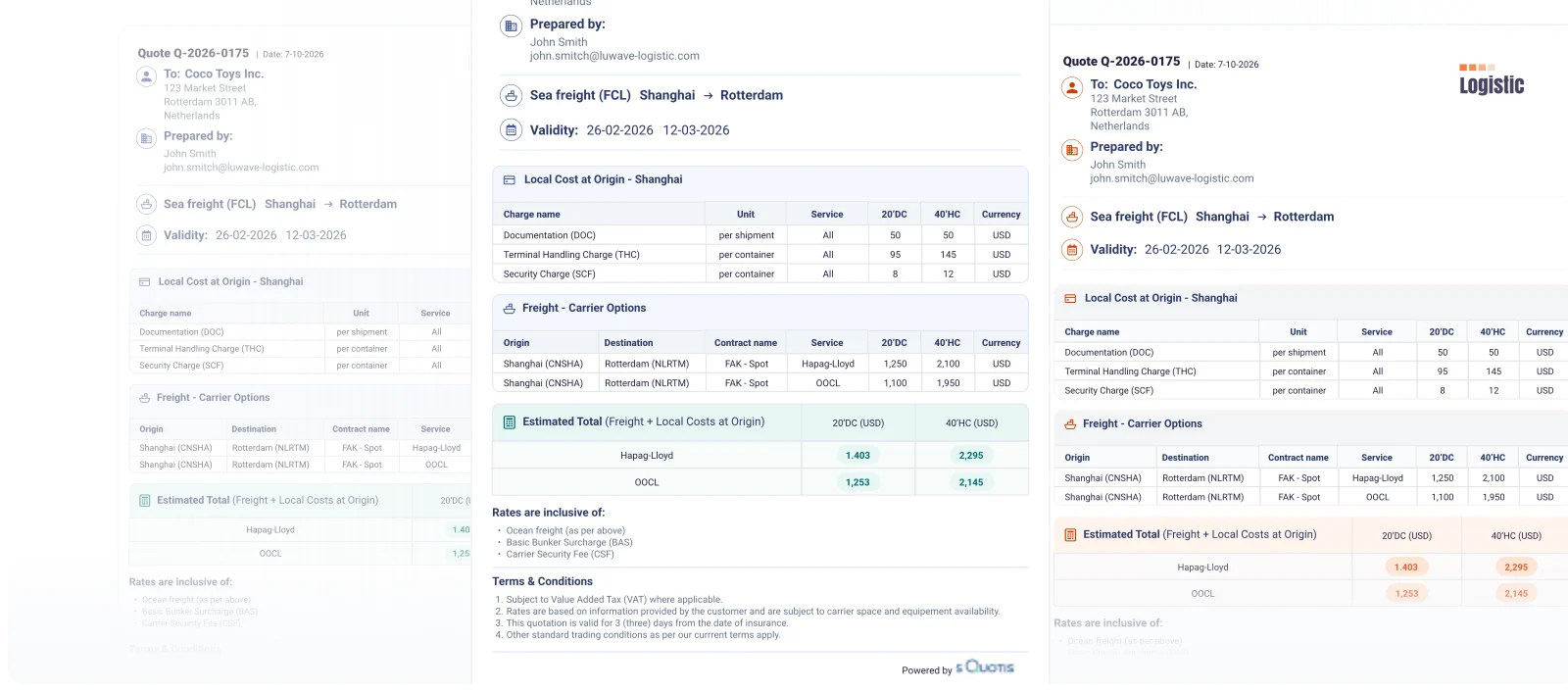
Build the right freight quote
for every opportunity
Create structured, professional quotes across Ocean, Air, Rail and Road — from a simple spot quote to complex multimodal offers.
Quotiss brings rates, margins, local charges and commercial rules together in one quoting workflow, helping your team build, send and manage freight quotes without starting from scratch every time.
One quoting system.
Every mode.
Different freight modes require different quote structures. Quotiss supports them all in one connected environment.
OCEAN
FCL LCL FCL TariffAIR
Air Freight Air TariffRAIL
FCL LCLROAD
FTL LTL PTLDon’t see the exact format you need? Manual mode gives your team the flexibility to handle exceptional or non-standard requests.
From rates to a ready-to-send quote
-
Start with the customer request
Enter shipment details in the quote header, or let Quotiss AI extract them directly from the customer request.
-
Find and select freight rates
Review your rate options from tariff and spot rates maintained by your commercial teams, to live rates searched through connected integrations.
-
Apply local charges
Add relevant local charges from your database, configured by port, airport or other applicable location.
-
Build and customize your freight quote
Apply margins and pricing rules, adjust charges where needed, and choose the best layout option for the quote. Keep the flexibility to tailor each offer to the customer.
-
Send directly from Quotiss
Send your freight quote via your connected email account, including as part of an existing email conversation.
-
Follow up and track progress
Monitor quote status, manage customer follow-ups and keep track of each commercial opportunity after the quote is sent.
Your pricing rules.
Your quote standards.
Quotiss allows you to define reusable commercial elements such as:
-
Predefined margins
Apply established margin logic instead of calculating it from scratch for every quote.
Margins
-
Predefined local charges
Make frequently used charges readily available to the sales team.
Local Charges
-
Reusable quote templates
Start with the right structure for the shipment and mode instead of building every offer from a blank page.
Quote templates
-
Customer language
Generate customer-facing quote output in the language appropriate for each customer.
Customer-facing quotes
-
Flexible adjustments
Keep control when a specific customer, shipment or opportunity requires a different commercial approach.
Specific settings
Different ways
to start a freight quote
-
User
Create a freight quote manually in Quotiss by entering shipment details and selecting the required services.
-
Online
Turn customer requests submitted through an online form into structured freight quotes in Quotiss.
-
Forward
Forward a customer’s email request to Quotiss, where AI extracts shipment details and prepares a quote draft.
-
Client
Let customers send freight requests directly to Quotiss, ready for your team to review and quote.
Different sources. One structured quoting process.
Turn quoting into
a repeatable commercial process
Every customer request is different, but preparing a quote shouldn’t mean repeating the same manual work. Quotiss gives your commercial team a consistent process for building offers, applying pricing rules and responding to customers.
-
Increase quoting capacity
Reduce the repetitive work behind quote preparation so your team can handle more customer opportunities.
-
Build consistency into every offer
Give commercial teams a structured process for rates, margins, charges and quote layout options.
-
Keep commercial control
Standardize the parts of quoting that should follow company rules while allowing your team to make commercial decisions when needed.
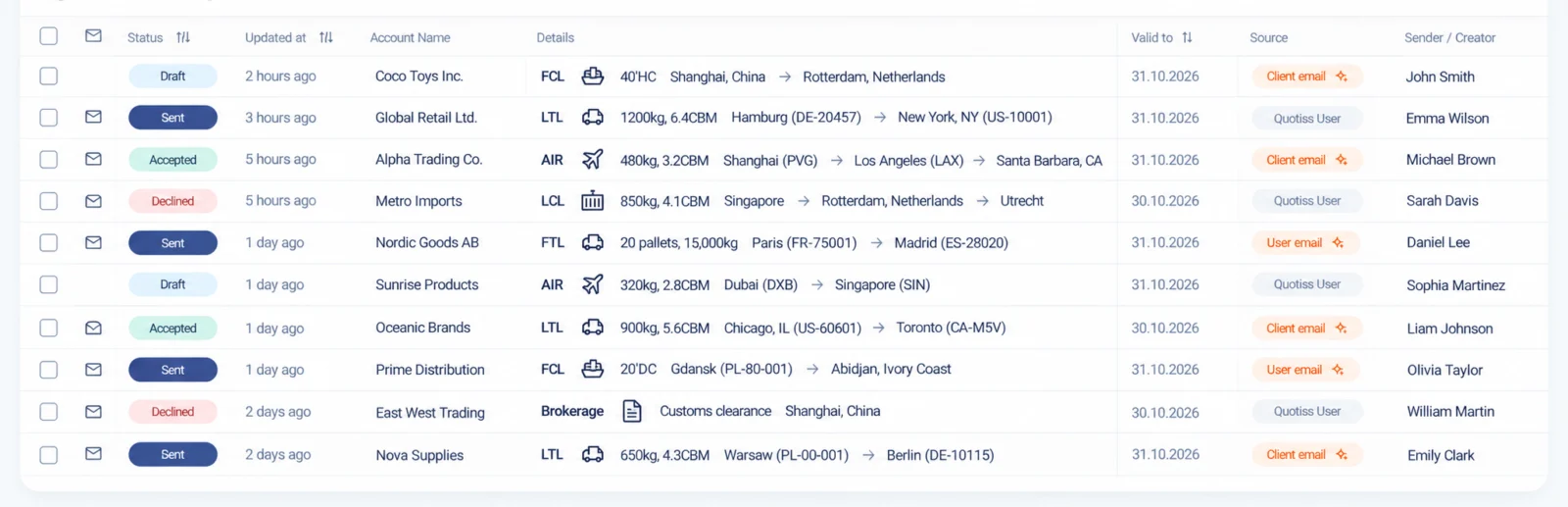
The quote is sent.
The opportunity continues.
-
Track status
Keep every freight quote connected to the commercial opportunity, from customer negotiations to the final outcome.
-
Negotiate
Keep the conversation going. Adjust rates, charges or margins and send an updated quote as negotiations progress.
-
Replicate
Create a new quote from an existing one, reusing shipment details and pricing structures to save time on similar requests.
-
Accept or Decline
Mark a quote as accepted and record the won volumes, or mark it as declined and specify the reason. Keep a clear view of your quoting results.
Turn more freight requests
into commercial opportunities.
See how Quotiss connects freight rates, quote preparation, customer communication and follow-up in one workflow.

Contact
See how Quotiss fits
your commercial process
Every freight forwarder works differently. Let us show you how Quotiss can connect your rates, quoting, customer management and commercial analytics — across your freight modes.

Margarita Tokareva
Co-founder & COO
Contact us
Tell us a little about your business and we'll show you how Quotiss could work for your commercial team.